
Leeke Associates - Consulting Engineers Leeke Associates


PLog – PDA-based Field Borehole and Well Logging Software

Leeke Associates Home
Services Services
  Mechanical & Electrical Engineering Mechanical & Electrical Engineering
  Geotechnical & Environmental Engineering Geotechnical & Environmental Engineering
  Railway Geotechnics Railway Geotechnics
  Building & Civil Engineering Building & Civil Engineering
  Energy & Process Engineering Energy & Process Engineering
  Health & Safety Health & Safety
  Forensic & Expert Witness Forensic & Expert Witness
gINT Software Software
  gINT Software gINT Software
  Extensions gINT Tools
  Extensions PLog Field Logging
  Extensions CPT Data Processing
  ESRI ArcGIS ESRI ArcGIS
  gINT consultancy and training gINT Consultancy & Training
Key Personnel Key Personnel
Contact Contact
Vacancies Vacancies


Mechanical Engineering header divider
Leeke Associates Ltd
The Courtyard
147 Worcester Road
Hagley
West Midlands
DY9 0NW

Tel: 01562 882976
Fax: 01562 882164
DX: 15441 Hagley

Email:
info@leekeassociates.co.uk

Expert Witness 2004

Advanced geotechnical and geoenvironmental software

PLog is the industry leader in borehole recording technology and our flagship product. It is the most advanced tool you can use to collect your geotechnical and geoenvironmental boring log data in the field. It is the first step in getting your boring logs completed.  Click here to view screen shots of PLog.

Starting your geotechnical and geoenvironmental project in PLog

You start your project as you do now: determining what you need to do for each borehole. This includes how many samples in each borehole, what sample types for each borehole, what sampling interval within each borehole, what well installations to use, et cetera. You can enter your project information such as project number, name locationon into your PDA before you ever leave the office. This is the same as writing the project information in your boring log book. With that step complete, you are ready to grab your tools, hard hat and PDA and head to the field to drill boreholes and gather boring log data.


Gathering your boring log field data using PLog

PLog allows you to record more than just your soil and rock descriptions for each boring log.  Once you are in the field, you use PLog to record your borehole information including soil and rock sample information, soil and rock stratigraphy layers, environmental measurements such as those determined from PID and FID instruments, shear strength test results, drilling notes, blow count results, ground water observations, and monitoring well or inclinometer installation information for each borehole. All of your borehole information is organised and stored safely on the PDA until you delete it.


You use simple PDA navigation to access your borehole field data in PLog.  When you log a borehole using PLog, the effort spent clicking from screen to screen to add or review data is minimal. You would likely spend the same amount of time leafing through your field book to review a boring log as you would clicking through pages in PLog to review a soil description or test result for a borehole.


With PLog, input your data quickly and easily for each borehole by selecting from lists, buttons, and checkboxes.  Time spent writing on the PDA for borehole or project information is minimised when you use PLog. You select drillers' names, engineers' names, drilling methods and more from pre-populated drop down menus which aids in rapid data entry as well as standardisation within your organisation. You select boring log description items instead of writing them.


PLog speeds data entry by automatically repopulating data for you within a borehole and among boreholes.  Your writing time is minimised because data for the borehole and borehole samples is automatically repopulated for subsequent boreholes and borehole samples with information you previously entered. You only need to enter your driller's name one in one boring log. Subsequent boreholes will have the same value until you change it.

You use the same drop-down menu selection process when developing your boring log soil or rock descriptions. You can input very loose dark brown silty sand with trace organics, a 53 letter phrase, with only seventeen taps on your PDA. You do not have to write a single letter!


In addition, once you finish a description, you can copy it to any other soil or rock sample or to any other soil or rock layer in any other borehole within the project. You can also modify the descriptions after you have copied it, if you need to do so.

PLog – the geotechnical and geoenvironmental software that helps you generate complete borehole logs in seconds! 

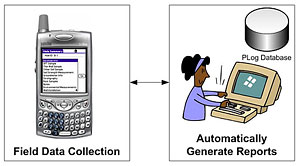
Whether after a single day or a week in the field recording borehole data, you can have draft boring logs ready for review within minutes of downloading your borehole data to your computer. You use the HotSync function and the borehole data is uploaded from your PDA to your PC. Once your borehole data is in the PLog PC module, you can export it to applications such as gINT or LD4. With the click of a button your borehole data is in your boring log reporting software tool and you can print a completed draft boring log ready for review. You have a draft boring log to present within minutes of completing the drilling activities - pretty quick turn around time, especially for a boring log report!


Customise PLog to fit your field data collection requirements for every borehole

When you receive PLog you will need to customise many of the drop-down lists to your company standards, and change the order of items in the lists. You can do both of these things easily using the PLog Configuration Tool, the PC portion of PLog.


In the PC Configuration Tool you can change values for any drop-down list available in PLog. Additionally, if there are items which you do not evaluate in the field when building your boring log, you can hide the item so you never see it and do not get slowed down by it when logging your borehole. If you determine you need to use specific list items for your boring log, you can always go back and re-activate them. Additionally, for borehole items you use often when logging a borehole, you can move “often used items” to the top of a drop-down list, and “less often used items” to the bottom.


PLog improves the quality of your geotechnical and geoenvironmental data on every boring log you draft

Input your borehole data once, digitally, using PLog

No Typos.  Your borehole data is entered into an electronic device one time - in the field – when the borehole is being drilled. You do not have to type your borehole data into a computer from your handwritten field boring logs once you have returned to the office. This helps avoid typos which are common when re-entering borehole data on a computer the office from handwritten boring logs.


Consistent Geotechnical and Geoenvironmental Terminology on every boring log. 

You decide which values are in the drop down menus for geotechnical and geoenvironmental projects. Your boring log data will not be a hodge-podge of styles from several engineers and geologists. Rather, the terminology used will be consistent from project to project, and borehole to borehole.


PLog improves your geotechnical and geoenvironmental data quality on every boring log


Consistent Soil/Rock Description Ordering and Formatting on every boring log.

With PLog, you create your soil and rock descriptions from a series of drop-down lists. Your company standard boring log format is built when the data is imported into gINT or other boring log output program. Your soil and rock descriptions will always be built, for every borehole, from the components, with the order and formatting you require.


Your borehole data is validated by PLog in the field. You can no longer make small mistakes such as having very loose clay or an RQD greater than your recovery length.


View an example Borehole Log Report (PDF).